

Go to Most Played






































Be the first to comment

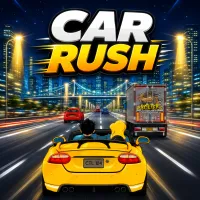
Hit the gas, accelerate, and race through challenging roads in Car Rush! The game delivers a high-speed driving experience combined with time-based challenges, where every turn and obstacle can determine success or failure. From scorching desert roads to modern highways, each race demands precise control and quick reflexes.
Car Rush is an exciting arcade racing game where players drive a sports car through various environments and reach the finish line before time runs out. Unlike racing games that focus on overtaking opponents, the biggest challenge here is maintaining maximum speed, avoiding obstacles, and completing the track within the time limit.
You take on the role of a racer who constantly conquers increasingly difficult routes. Each area contains multiple levels with growing complexity, featuring sharper turns, moving traffic, and unexpected obstacles. Your ultimate goal is to complete all races with the best time possible. Do you have the skills to overcome every road and reach the finish line before the timer hits zero? Start your engine and begin your high-speed journey right now!
Step 1: Start and Accelerate
As soon as the race begins in Car Rush, accelerate quickly to make the most of the available time.
Step 2: Watch the Road Ahead
Always pay attention to other vehicles, turns, and obstacles that appear on the track.
Step 3: Control Your Car Carefully
Move left or right to avoid collisions and keep your car in the best possible position.
Step 4: Master the Turns
Reduce your steering angle and take smooth corners to avoid losing speed.
Step 5: Avoid All Collisions
Crashing into other vehicles or obstacles can cost valuable time and affect your final result.
Step 6: Reach the Finish Line Before Time Runs Out
Each level has its own time limit. Maintain a steady speed to complete the race on time.